



Backup & restore
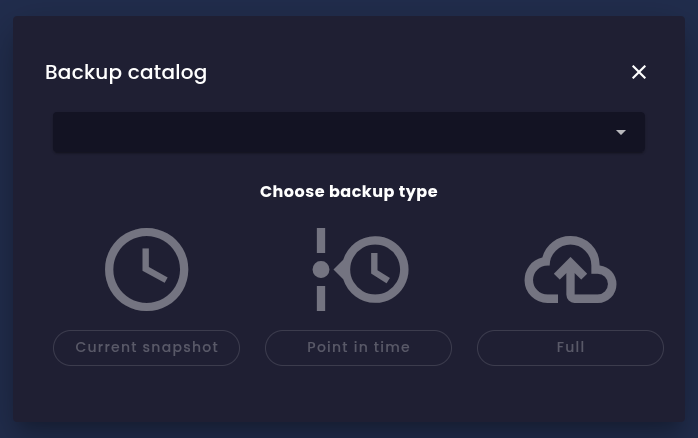 Backup options in evitaLab
None of these backup options interferes with normal database operations; you can continue to read and write data while the backup is being created. Because of the append-only storage architecture, the backup process can run safely without blocking any operations. However, keep in mind that creating a backup may have some performance impact.
Current snapshot
The current snapshot contains a copy of the current data and, optionally, the contents of the transaction log (WAL), if you request that option when the backup is created. The contents of the transaction log are copied in full, and they may contain operations already reflected in the snapshot as well as operations that haven't been applied yet. When you restore data from such a backup, the snapshot is restored first, and then all unprocessed operations from the transaction log are applied in the order they were originally executed. This way, you can restore the database to the exact state it was in at the moment of backup creation. If you don't include the transaction log in the backup, the database is restored to the state it was in at the time of snapshot creation but might miss some unprocessed updates. The benefit of this approach is that a snapshot backup without WAL is the smallest possible backup you can create.
Point-in-time snapshot
There is a limited time window in the past for which you can create PIT snapshots. Two independent limits bound that window, and whichever one is reached first decides how far back you can go.
If you try to create a PIT snapshot for a timestamp older than the oldest retained historical data, the operation will fail. By tuning these configuration parameters, you can control how far back in time you can create PIT snapshots. The period is highly dependent on database activity - the more updates you perform, the more historical data is generated, and the faster both the WAL files are rotated and the size budget is consumed.
You can include transaction log (WAL) files in the PIT snapshot backup as well, but this is intended only for debugging use cases. When you restore from a PIT snapshot that includes WAL files, the database is restored to the specified point in time, and then all operations from the included WAL files that were executed after that point are applied. You will end up with the current state of the database, just like with a current snapshot backup that includes WAL files.
Full file system copy
The full file system copy is the simplest way to back up the database. It copies and compresses the entire catalog storage directory, with files processed in the correct order. It might be quite large, but it contains all data, including historical data. When you restore from such a backup, the database is restored to the exact state it was in at the moment of backup creation. You can still perform PIT backups from a database restored this way, as all historical data is still present.
Restoring a catalog to a past version
- a point-in-time snapshot of the requested version is created,
- the snapshot is restored into a temporary catalog,
- the temporary catalog is loaded and its indexes are built,
- the temporary catalog takes the place of the target catalog.
Only the last step is visible to your clients, and it is a pointer swap that takes the same negligible time whatever the size of the catalog. Everything before it happens beside the running catalog, which keeps answering queries and accepting writes throughout. Sessions open across the swap are closed and have to be reopened; a query already in flight always finishes.
The whole operation is tracked as a single background task, so a user interface can show its progress and report when the catalog is ready.
- The catalog being replaced is removed together with its entire history. Create a full file system copy first if you may want that state back.
- The restored catalog carries no transaction log. Its history begins at the moment it is restored, so it cannot itself be taken back to a version older than that. The log is excluded on purpose: a restore that included it would replay the log forward and end up at the state you are trying to leave.
- Writes committed to the replaced catalog after the selected version are discarded with it. This includes writes committed while the operation is running, as the catalog keeps accepting them until the swap.
Naming a target catalog other than the source leaves the source untouched and puts the restored state under that name instead - replacing the catalog that holds it, or creating it when the name is free. Which catalog is to be replaced is decided when the operation starts, and the operation keeps to that decision: if the target is dropped, replaced by another catalog, or - where it was free - taken by one while the restore is running, the restore fails instead of publishing over a catalog it was not aimed at.
If the operation fails or is cancelled before the final swap, the catalog it was going to replace is left exactly as it was, and the intermediate snapshot stays among the files available for download so the restore can be repeated by hand. Cancellation is noticed only at the boundaries between the steps, so a cancellation that arrives once the swap has begun does not stop it - the swap commits and the catalog is replaced regardless. An operation that reaches the swap gives the snapshot up; a snapshot that cannot be removed is reported in the log rather than failing the operation, so it may occasionally outlive a successful run.