



Histogram
Histograms serve a pivotal role in e-commerce parametrized filtering by visually representing the distribution of product attributes, enabling customers to adjust their search criteria efficiently. They facilitate a more interactive and precise filtering experience, allowing users to modify the range of properties like price or size based on actual item availability.
There are actually only a few use cases in e-commerce websites where histograms are used. The most common is the price histogram, which is used to filter products by price. You can see an example of such a histogram on the Booking.com website:
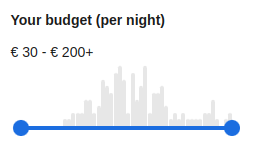 Booking.com price histogram filter
It's a shame that the histogram isn't used more often, because it's a very useful tool for gaining insight into the distribution of product attributes with high cardinality values such as weight, height, width and so on.
The histogram data structure is optimized for frontend rendering. It contains the following fields:
- min - the minimum value of the attribute in the current filter context
- max - the maximum value of the attribute in the current filter context
- overallCount - the number of elements whose attribute value falls into any of the buckets (it's basically a sum of all bucket occurrences)
- buckets - an sorted array of buckets, each of which contains the following fields:
- threshold - the minimum value of the attribute in the bucket, the maximum value is the threshold of the next bucket (or max for the last bucket)
- occurrences - the number of elements whose attribute value falls into the bucket
- relativeFrequency - the height the bar should be drawn at, on a 0-100 scale. It is a rendering intensity,
never a count and never a probability - use occurrences for anything numeric you show to a person, and
occurrences / overallCount for a share:
- For standard histograms: percentage of total occurrences, calculated as (occurrences / overallCount) * 100. The values sum to 100 and empty buckets are 0.
- For equalized histograms: the smoothed value density at the bucket, normalized against the maximum of the density curve, so the value lies in (0, 100] where 100 is the tallest point of the distribution. The values do not sum to 100, and there are no empty buckets. See equalized histograms in practice for what a client must and must not do with it.
- requested:
- contains true if the query didn't contain any attributeBetween or priceBetween constraints
- contains true if the query contained attributeBetween or priceBetween constraint for particular attribute / price and the bucket threshold lies within the range (inclusive) of the constraint
- contains false otherwise
Attribute histogram
- argument:int!
the number of columns (buckets) in the histogram; number should be chosen so that the histogram fits well into the available space on the screen
- argument:enum(STANDARD|OPTIMIZED|EQUALIZED|EQUALIZED_OPTIMIZED)
The behavior of the histogram calculation:
- STANDARD (default): Returns exactly the requested number of buckets with equal-width intervals across the value range.
- OPTIMIZED: Returns fewer buckets when data is sparse to avoid large gaps (empty buckets).
- EQUALIZED: Positions bucket boundaries on the empirical quantile function so each bucket covers approximately equal portion of total records. This provides better user experience when data is heavily skewed. Never returns more buckets than requested and returns fewer whenever a single value is held by so many records that it collapses several quantile intervals into one.
- EQUALIZED_OPTIMIZED: Deprecated since 2026.2 - use EQUALIZED. Identical to EQUALIZED. The equalized algorithm places every boundary on a value the data actually contains and therefore never produces an empty bucket, so there is nothing left to optimize away.
- argument:string+
- one or more names of the entity attribute whose values will be used to generate the histograms
To demonstrate the use of the histogram, we will use the following example:
The simplified result looks like this:
The histogram result in JSON format is a bit more verbose, but it's still quite readable:
Attribute histogram contents optimization
To demonstrate the optimization of the histogram, we will use the following example:
The simplified result looks like this:
The optimized histogram result in JSON format is a bit more verbose, but it's still quite readable:
As you can see, the number of buckets has been adjusted to fit the data, contrary to the default behavior.
Attribute histogram equalization
Standard histograms use equal-width buckets across the entire value range. This works well for uniformly distributed data but can be problematic when data is heavily skewed. For example, if 90% of products have width between 10-50 cm and only 10% have width between 50-500 cm, equal-width buckets would cram most products into the first few buckets while leaving many empty buckets in the upper range.
- Calculates the total weight (sum of all record counts)
- Calculates cumulative frequency for each unique value
- Places a boundary at the first value whose cumulative frequency reaches each rank k / bucketCount — this is the empirical quantile function, sampled at evenly spaced ranks
- Drops duplicate boundaries, and, when one value absorbed two or more ranks, additionally opens a bucket at the next value so that the heavy value's records are closed into a bucket of their own
- Counts actual occurrences in each resulting bucket
To demonstrate equalized histogram, we will use the following example:
The simplified result looks like this:
The equalized histogram result in JSON format is a bit more verbose, but it's still quite readable:
As you can see, unlike standard histograms where bucket widths are equal, equalized histograms adjust bucket widths to distribute records more evenly. This makes the histogram more useful for filtering when data has a skewed distribution.
Price histogram
- argument:int!
the number of columns (buckets) in the histogram; number should be chosen so that the histogram fits well into the available space on the screen
- argument:enum(STANDARD|OPTIMIZED|EQUALIZED|EQUALIZED_OPTIMIZED)
The behavior of the histogram calculation:
- STANDARD (default): Returns exactly the requested number of buckets with equal-width intervals across the value range.
- OPTIMIZED: Returns fewer buckets when data is sparse to avoid large gaps (empty buckets).
- EQUALIZED: Positions bucket boundaries on the empirical quantile function so each bucket covers approximately equal portion of total records. This provides better user experience when data is heavily skewed. Never returns more buckets than requested and returns fewer whenever a single value is held by so many records that it collapses several quantile intervals into one.
- EQUALIZED_OPTIMIZED: Deprecated since 2026.2 - use EQUALIZED. Identical to EQUALIZED. The equalized algorithm places every boundary on a value the data actually contains and therefore never produces an empty bucket, so there is nothing left to optimize away.
Price histogram granularity and inner-record handling
| Inner-record handling | Histogram data point per entity |
|---|---|
| NONE | One — the price for sale of the entity |
| SUM | One — the cumulated price of all inner records |
| LOWEST_PRICE | One per inner-record id — the winning price of each variant |
To demonstrate the use of the histogram, we will use the following example:
The simplified result looks like this:
The histogram result in JSON format is a bit more verbose, but it's still quite readable:
Price histogram contents optimization
To demonstrate the optimization of the histogram, we will use the following example:
The simplified result looks like this:
The optimized histogram result in JSON format is a bit more verbose, but it's still quite readable:
As you can see, the number of buckets has been adjusted to fit the data, contrary to the default behavior.
Price histogram equalization
Just as with attribute histograms, standard price histograms use equal-width buckets which can be problematic for skewed price distributions. For example, in a marketplace where most items cost $10-$50 but a few luxury items cost $500-$5000, equal-width buckets would waste slider space on the expensive (but sparse) end.
To demonstrate equalized price histogram, we will use the following example:
The simplified result looks like this:
The equalized histogram result in JSON format is a bit more verbose, but it's still quite readable:
As you can see, the bucket boundaries are positioned to distribute products more evenly across the slider range.
Equalized histograms in practice
The equalized behaviour exists to solve two concrete problems that show up on real catalogues, one created by fixing the other. Neither is obvious until you put a slider in front of a shopper.
Problem 1 — a linear slider spends its track on the wrong products
This is a well-documented usability failure, not a theoretical one. Baymard Institute's slider research puts it plainly:
Linear slider scales will very often not be appropriate within e-commerce filtering, especially for price and budget. Normally the vast majority of products will be clustered within a relative narrow range with only a few outliers at either end of the scale.
— Christian Holst, Improve Form Slider UX With These 5 Requirements for Slider Interfaces, Baymard Institute, 2015
A production evitaDB catalogue of 3 237 products priced from 9 to 2 990 measures almost identically:
| On a linear track | Share of the catalogue |
|---|---|
| first half of the track | 90.9% of products |
| second half of the track | 8.2% of products |
| the track occupied by the middle 80% of products | 36.6% |
Baymard also recommends pairing any price slider with text inputs so an exact value can be typed. That is complementary to this feature, not replaced by it — an equalized track makes dragging viable, but typing is still the faster route to a specific number.
Problem 2 — equalizing the track makes the columns meaningless
What this gives you
- Uniform precision along the track. Every slider position moves past roughly the same number of products, instead of one half of the control doing 91% of the work.
- No dead slider positions. Every threshold is a price that actually occurs, so every stop selects a different set of products.
- Bars that mean something and stay put. Heights show where prices genuinely cluster, and repricing a single product moves the tallest bar by about 0.01%.
- A profile you can draw as-is. The tallest-to-shortest bar ratio on the production catalogue is roughly 13:1 — a readable chart with no compressing transform on the client.
- The trade: you may get fewer buckets than you asked for. When one price is shared by more products than a bucket is worth, there is no distinct price to split it at. Render however many came back.
- Scale the bar height against the constant 100 — height = chartHeight * relativeFrequency / 100.
- Draw each bar spanning [bucket.threshold, nextBucket.threshold), and the last one up to max. The value describes the whole bucket, not a point inside it.
- Give the last bar a minimum width. Its threshold can equal max — that happens whenever the largest value is numerous enough to be closed into a bucket of its own — so a bar drawn strictly to scale would be zero pixels wide even when it is the tallest one in the chart.
- Take slider stops from threshold. Every threshold is a real, selectable value, so every slider position yields a different result set.
- Use occurrences for anything numeric shown to the user ("142 products"), and occurrences / overallCount for a share.
- Don't apply sqrt or log. The value is already a linear rendering intensity with a moderate dynamic range — tallest-to-median is roughly 1.2–2.0 — so a compressing transform flattens a profile that is legitimately readable as it stands. Draw it directly.
- Don't divide by the sum of the buckets. Equalized values are normalized against the tallest point of the curve, not against each other, so they do not sum to 100.
- Don't scale against max() of the returned buckets. That re-couples the rendering to bucketCount — ask for more buckets and every bar would change height even though the distribution did not.
- Don't assume exactly one bucket reads 100. The denominator is the curve maximum over all observed values, not over the returned buckets, so a response may legitimately contain zero buckets at 100, or several. Only 0 < relativeFrequency <= 100 is guaranteed.
- Don't assume bucketCount buckets came back. Fewer is normal and correct, as explained above.
- Don't compare relativeFrequency across behaviours or across two different histograms. It is a per-response rendering scale.
- The count term is the number of distinct values, not the number of records. Silverman's n^(−1/5) assumes you are inferring an unknown distribution from a sample, so more observations justify a sharper estimate. Here the catalogue is known in full — this is a smoothing of data already in hand, not an inference about a population behind it. Cloning every product would leave the distribution's shape identical, so it must leave the curve identical; counting records instead would sharpen it by about 13% for every doubling of an unchanged catalogue.
- A value holding a large share of the data is capped before the spread is measured. A single value holding more than half the weight spans the entire interquartile range on its own, which drives the IQR term towards zero and collapses the bandwidth with it. The cap is applied as a smooth min(w, (N − w) / 2) rather than as an if (w > N / 2) switch, because a threshold is discontinuous exactly where real data tends to sit — a catalogue at 50.1% on one value would otherwise be redrawn by a single product crossing 50%. The cap affects only the spread estimate, never the bucket contents.
- The quartiles are averaged over a band of ranks rather than read at a point. A point-valued quantile is a step function of the weights: it jumps by a whole gap the moment one observation crosses a rank boundary. Averaging the quantile function over a narrow band around each quartile — an L-estimator, Q̄(p) = 1/(2r) · ∫ Q(u) du — makes it move continuously instead. Linear interpolation between neighbouring order statistics would also be continuous, but it can return a value that lies inside a gap where no product exists, which on a catalogue with one very expensive item puts the estimate somewhere no data is.
Baseline relaxation — sliders don't contract under their own handles
How evitaDB applies the relaxation
- Attribute range sliders — attributeBetween and histogramHaving. These drive attribute histograms, both on plain entity attributes and on reference-level histograms.
- Facet selections — facetHaving. These drive the facet summary and its impact calculations.
- Price range — priceBetween. This drives the price histogram.
Worked example
| Self-computation | What the baseline hides | What the baseline keeps applied |
|---|---|---|
| height histogram | every attribute range slider — attributeBetween("height", …) and every other attributeBetween or histogramHaving in the same userFilter | facetHaving("brand", …), priceBetween(100, 500) |
| width histogram | the same — every attribute range slider is peeled for any attribute histogram in the query | facetHaving("brand", …), priceBetween(100, 500) |
| facet impact for other brands | every facetHaving selection | attributeBetween("height", …), priceBetween(100, 500) |
| price histogram | priceBetween(100, 500) | facetHaving("brand", …), attributeBetween("height", …) |
Recommended range carriers
| Slider lives on … | Recommended userFilter child |
|---|---|
| a plain entity attribute (Product.width, Product.height, …) | attributeBetween |
| a reference-level histogram (e.g. parameterValues.height on Product) | histogramHaving — the first-class carrier for reference histograms; also disambiguates between multiple histograms on the same reference |
| the price for sale | priceBetween |
| a facet selection | facetHaving |