Special behavioural filter constraint containers are used to define a filter constraint scope, which has a different
treatment in calculations, or to define a scope in which the entities are searched.
In Scope
argument:enum(LIVE|ARCHIVED)
mandatory enum argument representing the scope to which the filter constraints in the second and subsequent
arguments are applied
filterConstraint:any+
one or more mandatory filter conditions, combined by a logical link, used to filter entities only in
a specific scope
The inScope (
) filter container is used
to restrict filter conditions so that they only apply to a specific scope.
The evitaDB query engine is strict about indexes and does not allow you to filter or sort on data (attributes, references,
etc.) for which no index has been prepared in advance (it tries to avoid situations where a full scan would degrade query
performance). Scopes, on the other hand, allows us to get rid of unnecessary indexes when we know we will not need them
(archived data is not expected to be queried as extensively as live data) and free up some resources for more important
tasks.
The scope filter constraint allows us to query entities in both scopes at once, which would be impossible if
we couldn't tell which filter constraint to apply to which scope. The inScope container is designed to handle this
situation.
It's obvious that the inScope container is not necessary if we are only querying entities in one scope. However, if
you do use it in this case, it must match the scope of the query. If you use the inScope container with the LIVE
scope, but the query is executed in the ARCHIVED scope, the engine will return an error.
For example, in our demo dataset we have only a few attributes indexed in the archive - namely url and code and
a few others. We don't index references, hierarchy or prices in archive scope. If we want to search for entities in both
scopes and use appropriate filter constraints, we need to use the inScope container in the following way:
The result contains two entities selected by the URL attribute. The entity in the live scope also satisfies
the hierarchy and price constraints specified in the inScope container. However, these constraints may not be valid
for the entity in the archive scope, as can be seen by looking at the input query.
one or more mandatory filter constraints that will produce logical conjunction
The
works identically to the and constraint, but it distinguishes the filter scope, which is controlled by the user
through some kind of user interface, from the rest of the query, which contains the mandatory constraints on the result
set. The user-defined scope can be modified during certain calculations (such as the reference summary
or histogram calculation), while the mandatory part outside of userFilter cannot.
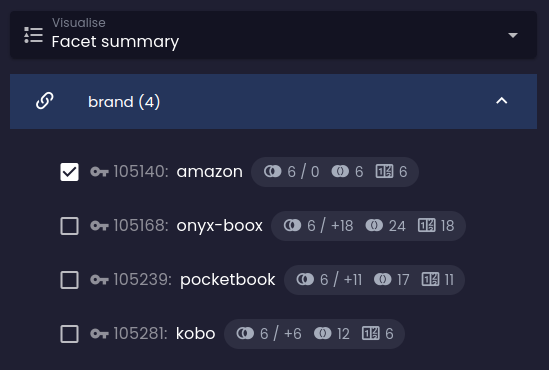
Let's look at the example where the facetHaving constraint is used inside
the userFilter container:
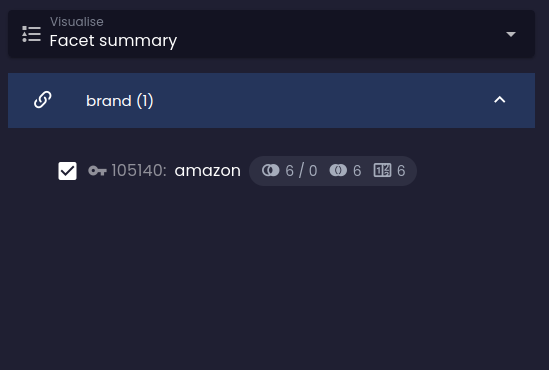
And compare it to the situation when we remove the userFilter container:
Facet summary with facetHaving in userFilter
Facet summary without userFilter scope
Before
After
As you can see in the second image, the facet summary is greatly reduced to a single facet option that is selected by
the user. Because the facet is considered a "mandatory" constraint in this case, it behaves the same as
the referenceHaving constraint, which is combined with other constraints via logical
disjunction. Since there is no other entity that would refer to both the amazon brand and another brand (of course,
a product can only have a single brand), the other possible options are automatically removed from the facet summary
because they would produce an empty result set.
How userFilter shapes predictions
When a query asks require() for a reference summary, a histogram, or a price histogram, the server has to answer
a different shopper-facing question for each prediction — and each question demands a different baseline. The
constraints a shopper drops into userFilter form three disjoint carrier families:
Carrier family
Constraints
Powers prediction
Facet carriers
facetHaving
Facet COUNT and IMPACT in referenceSummary
Value-range carriers
attributeBetween, histogramHaving
Attribute and per-parameter (reference) histograms
Price-range carriers
priceBetween
Price histogram
The full matrix of what each prediction sees of userFilter:
Computing prediction for…
Facet carriers
Value-range carriers
Price-range carriers
Facet COUNT (per option, universe-level)
dropped — entire userFilter is ignored
dropped
dropped
Facet IMPACT (per option, delta)
kept; selection simulated per group rules
kept
kept
Attribute / reference (per-parameter) histogram
kept
dropped
kept
Price histogram
kept
kept
dropped
The asymmetry is intentional. Facet COUNT is a stable upper bound — "how big is this option in this category"
— so the whole userFilter is dropped. Facet IMPACT is the what-if answer — "what would I see if I picked
this option from here" — so the whole userFilter is kept and the selection is simulated per the group's rules
(default OR-add, facetGroupsExclusivity replaces, facetGroupsConjunction AND-merges, etc.). The same group
rules leave COUNT alone, with one exception: facetGroupsNegation flips COUNT to the post-exclusion universe,
since for a "hide this" toggle that's the meaningful number. Histogram baselines answer "where should this
slider's handles sit" — they respect the rest of the shopper's intent but never their own family, so sliders
don't collapse and siblings in the same family keep their catalog-wide spans.
Constraints outside userFilter (the category, locale, currency, scope, price list) are never peeled. They define
the universe; the relaxation surface is userFilter and nothing else.
For the shopper-facing story behind these rules — why a panel that ignores them feels broken, and what the
price slider in particular costs to get right — see the blog post
The hidden mathematics of a faceted filter panel.




 Before
 After
After