



Reference summary
Reference summaries — historically called faceted filtering — are the core data structure that powers parameterised filtering UIs. The query asks evitaDB to return, alongside the matched entities, a tree of every related reference (brand, parameter, group, …) with hit counts, optional impact predictions and optional numeric histograms. Toggling these references in the UI gives users a real-time, count-aware way to drill into the result set. The benefits are twofold: it improves the user experience by making search far more targeted, and it measurably increases conversion on e-commerce sites by helping shoppers home in on the products that match their criteria.
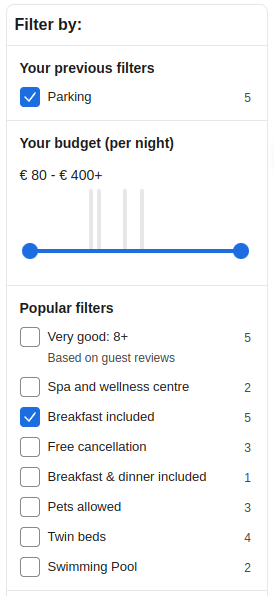 Facet filter example
The key success factor of a reference-driven (faceted) search is to help users avoid combinations that return zero results. It works best when the UI gradually limits the options that wouldn't make sense given what's already been selected, and provides accurate, on-the-spot, real-time feedback about the number of results that selecting another option would expand or restrict the current result by.
References are usually presented as lists of checkboxes, radio buttons, drop-down menus, or sliders, and are organised into groups. Options within a group typically expand the current selection (logical disjunction), and groups are typically combined with logical conjunction. Some options can be negated (logical negation) to exclude entities that match them.
High-cardinality options are sometimes presented as a search box or interval slider, often paired with a histogram of value distribution to let users specify an exact value or numeric range. evitaDB supports all of these shapes through the constraints documented in this chapter.
evitaLab visualization
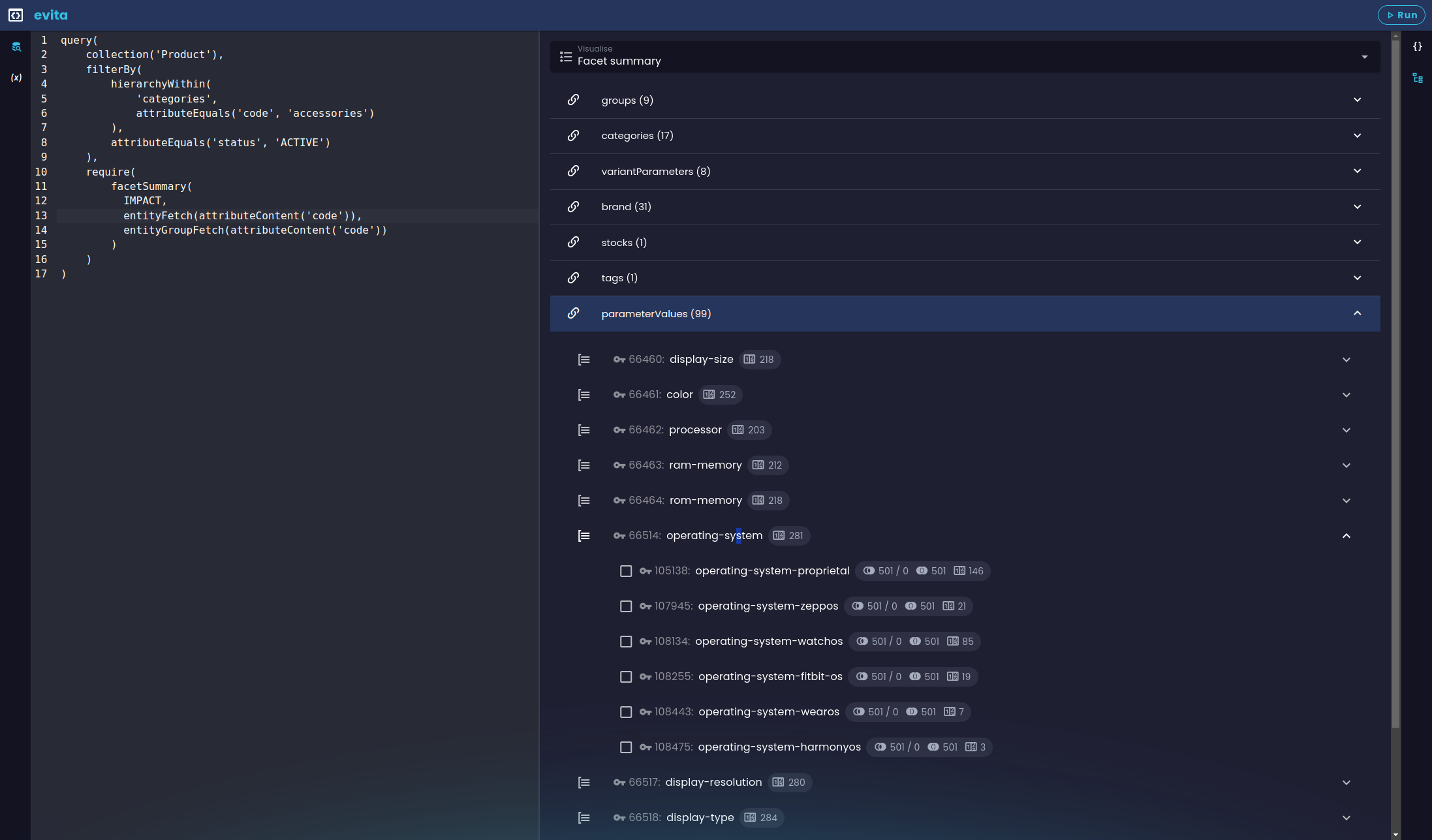 Reference summary visualization in the evitaLab console
The visualization mirrors the structure of the summary itself:
| Icon | Meaning |
|---|---|
 | At the top level you see the references, marked with the chain icon. |
 | Below them are the groups found inside those references, marked with the group icon, and below the groups are the individual reference options. |
 | The number of returned entities that match this reference option when the user has no other options selected (i.e. the userFilter is empty). |
 | The current number of entities matching the filter constraints; the slash separates this from the difference in result count if this option were added to the user filter. |
 | The total number of entities the result would contain if this option were selected (i.e. the size of the dataset that matches the option). |
Default reference calculation rules
- The reference summary is calculated only for entities returned by the current query (excluding the effect of the userFilter part of the query if present).
- The calculation respects every filter constraint placed outside the userFilter container.
- The default relation between options within a group is logical disjunction (logical OR), unless changed.
- The default relation between options in different groups / references is logical conjunction (logical AND), unless changed.
Reference summary
- argument:enum(COUNTS|IMPACT)?
Default: COUNTS
optional argument of type
controlling how deep the per-option statistics go:- COUNTS (default, implicit): each option carries only the number of returned entities that contain it
- IMPACT: each non-selected option additionally carries an impact prediction (matchCount, difference, hasSense) showing what would happen if the user selected it; affected by conjunction, disjunction, negation and calculation rules
- filterConstraint:filterBy
- optional filter limiting which individual reference options appear in the summary; can only target properties shared by all referenced entity types — for reference-specific filters use referenceSummaryOfReference instead
- filterConstraint:filterGroupBy
- optional filter limiting which reference groups appear in the summary; same cross-reference restriction as above applies
- orderConstraint:orderBy
optional order constraint that controls the sort order of reference options within each group
- orderConstraint:orderGroupBy
optional order constraint that controls the sort order of reference groups
- requireConstraint:entityFetch
- at most one entityFetch requirement that controls which fields of the reference (option) entity are loaded; identical semantics to entityFetch elsewhere — supports nested referenceContent with further entityFetch / entityGroupFetch to follow the entity graph
- requireConstraint:entityGroupFetch
- at most one entityGroupFetch requirement that controls which fields of the reference group entity are loaded
- requireConstraint:histogramStatistics*
- zero or more histogramStatistics children, one per named bucketed index declared on the reference schema (bucketed on the reference). Each child produces a per-group histogram keyed by the group entity's primary key and is the data source for slider widgets driven by histogramHaving. Only allowed when the targeted reference is configured with bucketed indexes; otherwise rejected at construction time.
Reference summary structure
- reference: the top tier — names of the references marked as faceted in the entity schema
- reference group: the second tier — groups specified in the returned entity's references
- reference option: the third tier — entities of the returned entity's references
1st tier: reference
2nd tier: reference group
There may also be a special "group" for options that aren't related to a group.
3rd tier: reference option
A reference option contains the per-option statistics:
- count
The number of entities in the current query result (including user-filter constraints) that have this option (i.e. reference an entity with this primary key).
- requested
- TRUE if this option appears in the userFilter container of this query, FALSE otherwise (so the UI can render the corresponding checkbox as checked).
- matchCount
- The number of entities that would match a new query derived from the current one if this option were selected (had a reference to the entity with this primary key). The current query is left intact, including the userFilter, but the option is virtually added to it to compute the hypothetical impact.
- difference
- The difference between matchCount (the hypothetical result) and the current number of returned entities — the impact size. It can be positive (the option would expand the result), negative (the option would restrict it), or 0 (no change).
- hasSense
- TRUE if the option combined with the current query still returns some results (matchCount > 0), FALSE otherwise. Lets the UI mark the corresponding checkbox as disabled when selecting it would yield zero results.
Fetching reference (group) bodies
Now the summary contains not only primary keys but also the readable codes of the options and their groups:
If you add the desired locale to the query and request the localised names instead of the codes, you'll get a result that's very close to what the user would see in the UI:
Filtering the reference summary
We don't restrict the search to a specific hierarchy — the filter alone is selective enough:
Ordering the reference summary
Let's sort both reference groups and options alphabetically by their English names:
The summary is now sorted where it makes sense:
Histogram statistics
- argument:int!
- mandatory requestedBucketCount — the desired number of histogram columns to compute. Pick a value that matches the pixel width of the histogram widget in the UI; typical values are 10–50. The actual bucket count may be lower under OPTIMIZED (empty buckets dropped) and under EQUALIZED / EQUALIZED_OPTIMIZED (a value held by many entities collapses several quantile intervals into one), but never higher.
- argument:enum(STANDARD|OPTIMIZED|EQUALIZED|EQUALIZED_OPTIMIZED)?
Default: STANDARD
optional
controlling how the bucket boundaries are placed and whether empty buckets are kept:- STANDARD: exactly requestedBucketCount equal-width buckets, including empty ones
- OPTIMIZED: same as STANDARD, but empty buckets are removed for a denser display (actual count ≤ requested)
- EQUALIZED: frequency-equalised boundaries (each bucket ends up with roughly the same number of occurrences), placed on values the data actually contains — so no bucket is ever empty, and the actual count may be lower than requested. relativeFrequency carries the smoothed value density rather than a share; see equalized histograms in practice
- EQUALIZED_OPTIMIZED: deprecated since 2026.2, use EQUALIZED — identical to EQUALIZED, because the equalised algorithm produces no empty buckets and there is nothing to suppress
- requireConstraint:entityFetch?
- optional fetch describing how richly the referenced (option) entities that contributed to the histogram should be loaded; mirrors the standard entityFetch
- argument:string!+
- one or more histogram index names as declared on the reference schema's bucketed clause. Each name produces a separate histogram entry in the result, keyed by the histogram name; an instance with no index names is rejected at construction time.
- the catalog-wide [min, max] span of the underlying value (the slider's outer handles)
- the bucket list with threshold (lower bound, inclusive), occurrences and relativeFrequency
- a requested flag per bucket indicating whether it intersects an active histogramHaving range carrier
Reference summary of reference
- argument:string!
- mandatory reference name as declared in the entity schema; the reference must be marked as faceted
- argument:enum(COUNTS|IMPACT)?
- statistics depth, same semantics as in referenceSummary; defaults to COUNTS
- filterConstraint:filterBy
- filter on the referenced (option) entity — because the constraint targets exactly one reference type, you can use any filterable property of that entity, not just properties shared across all faceted references
- filterConstraint:filterGroupBy
- filter on the reference group entity; same per-reference freedom as above
- orderConstraint:orderBy
ordering of reference options within each group; can use any sortable property of the reference entity
- orderConstraint:orderGroupBy
ordering of reference groups by sortable properties of the group entity
- requireConstraint:entityFetch / entityGroupFetch
- at most one of each, identical semantics to referenceSummary
- requireConstraint:histogramStatistics*
- zero or more histogramStatistics — same rules as for referenceSummary, scoped to this reference only
A fairly complex scenario that exercises every key feature of the per-reference summary:
Entity group fetch
Entity fetch
Facet groups conjunction
- argument:string!
- Mandatory argument specifying the name of the reference to which this constraint refers.
- argument:enum(WITH_DIFFERENT_FACETS_IN_GROUP|WITH_DIFFERENT_GROUPS)
Default: WITH_DIFFERENT_FACETS_IN_GROUP
Optional enumeration argument specifying whether the relationship type should be applied to options at a particular level (within the same reference group, or to options in different reference groups / references).
- filterConstraint:filterBy
Optional filter constraint that selects one or more reference groups whose options will be combined with logical AND instead of the default logical OR.
If the filter is not defined, the behaviour applies to all groups of a given reference in the summary.
| Default behaviour | Altered behaviour |
|---|---|
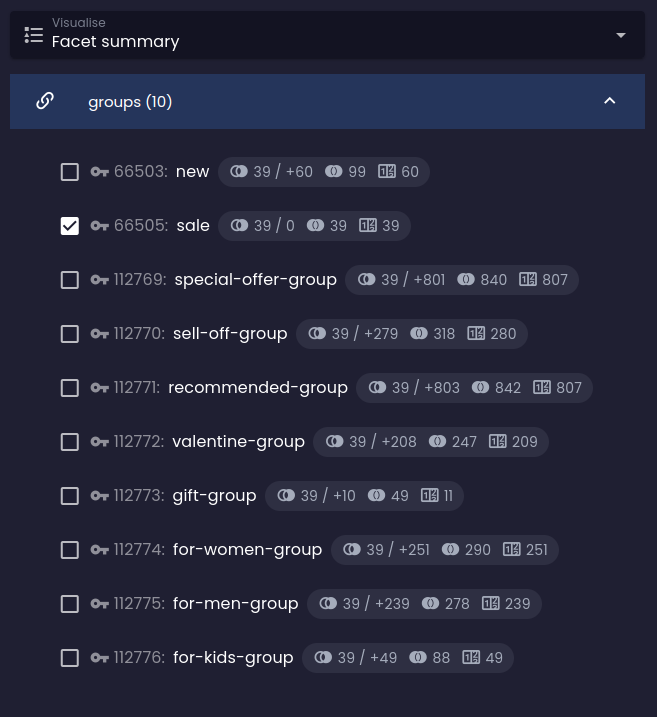 Before Before | 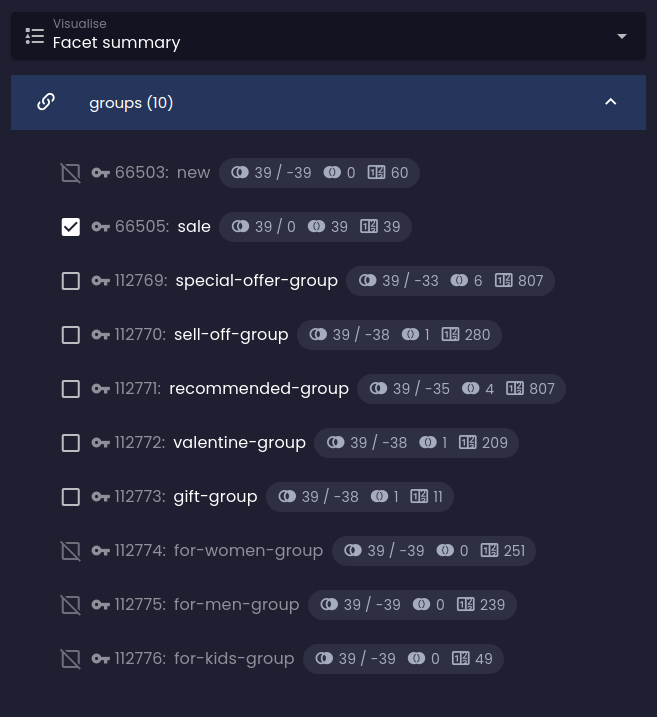 After After |
Instead of increasing the number of results, impact analysis now predicts a reduction:
Facet groups disjunction
- argument:string!
- Mandatory argument specifying the name of the reference to which this constraint refers.
- argument:enum(WITH_DIFFERENT_FACETS_IN_GROUP|WITH_DIFFERENT_GROUPS)
Default: WITH_DIFFERENT_GROUPS
Optional enumeration argument specifying whether the relationship type should be applied to options at a particular level (within the same reference group, or to options in different reference groups / references).
This is the one constraint of the four whose default is WITH_DIFFERENT_GROUPS, and it defaults there for the same reason the others default to WITH_DIFFERENT_FACETS_IN_GROUP: a constraint defaults to the level at which it changes something. Disjunction is already the system default within a group, so at that level the constraint does nothing unless facetCalculationRules has changed the within-group default first — which is a legitimate use, just not the common one.
- filterConstraint:filterBy
Optional filter constraint that selects one or more reference groups whose options will be combined with logical disjunction (logical OR) with options from different groups instead of the default logical conjunction (logical AND).
If the filter is not defined, the behaviour applies to all groups of a given reference in the summary.
| Default behaviour | Altered behaviour |
|---|---|
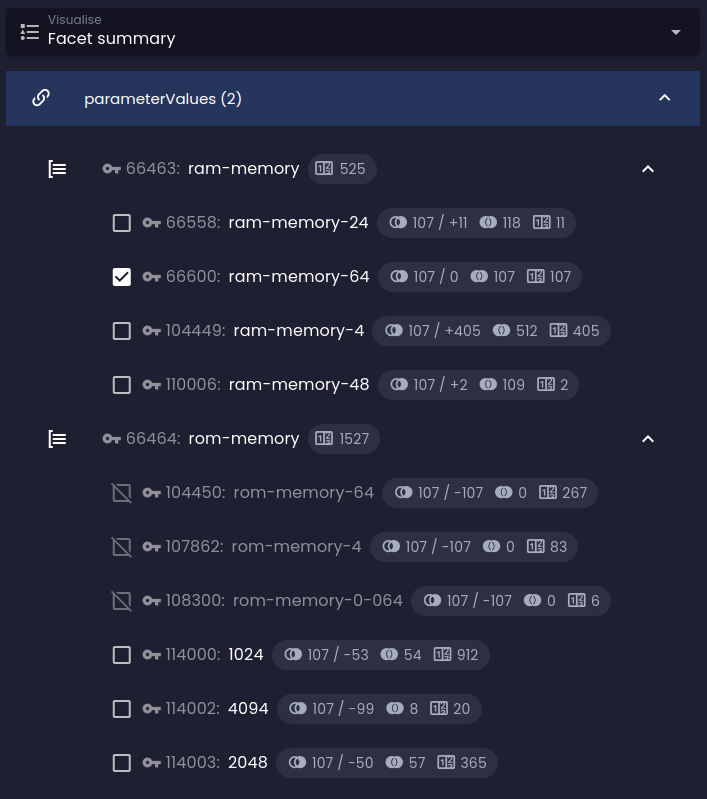 Before Before | 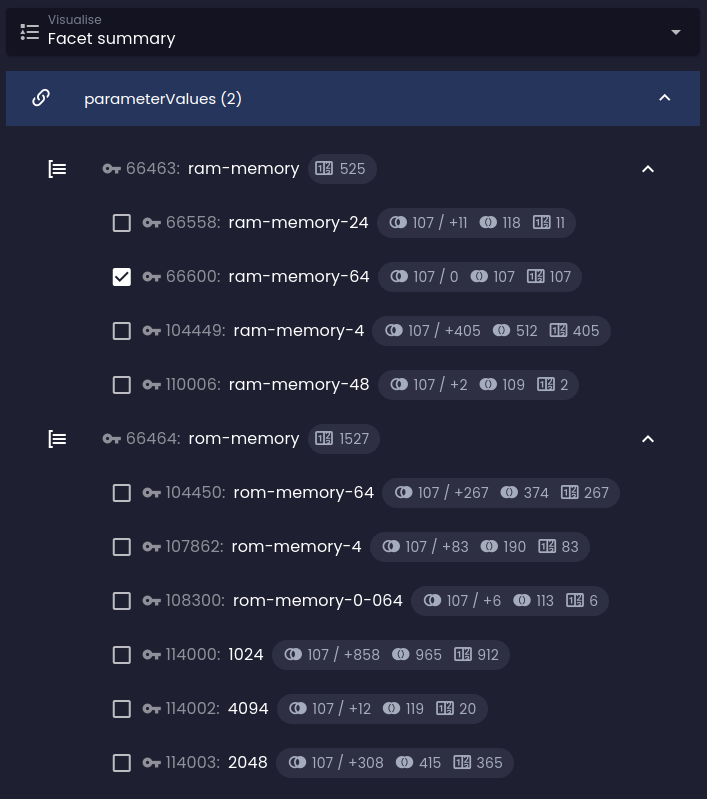 After After |
Instead of reducing the number of results, impact analysis now predicts an expansion:
Facet groups negation
- argument:string!
- Mandatory argument specifying the name of the reference to which this constraint refers.
- argument:enum(WITH_DIFFERENT_FACETS_IN_GROUP|WITH_DIFFERENT_GROUPS)
Default: WITH_DIFFERENT_FACETS_IN_GROUP
Optional enumeration argument specifying whether the relationship type should be applied to options at a particular level (within the same reference group, or to options in different reference groups / references).
- filterConstraint:filterBy
- Optional filter constraint that selects one or more reference groups whose options are negated. Instead of returning items that reference the entity in question, the result returns items that do not reference it.
If the filter is not defined, the behaviour applies to all groups of a given reference in the summary.
| Default behaviour | Altered behaviour |
|---|---|
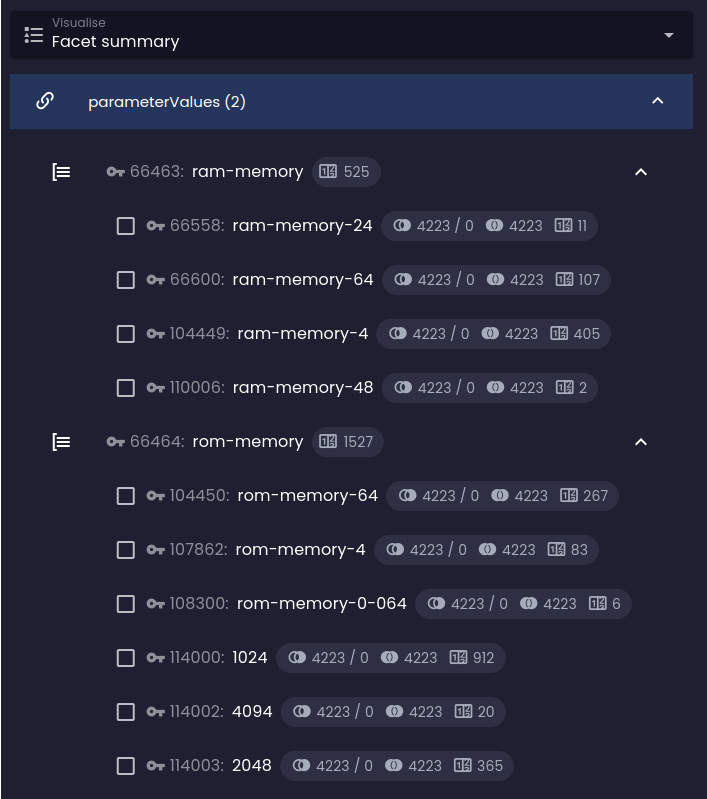 Before Before | 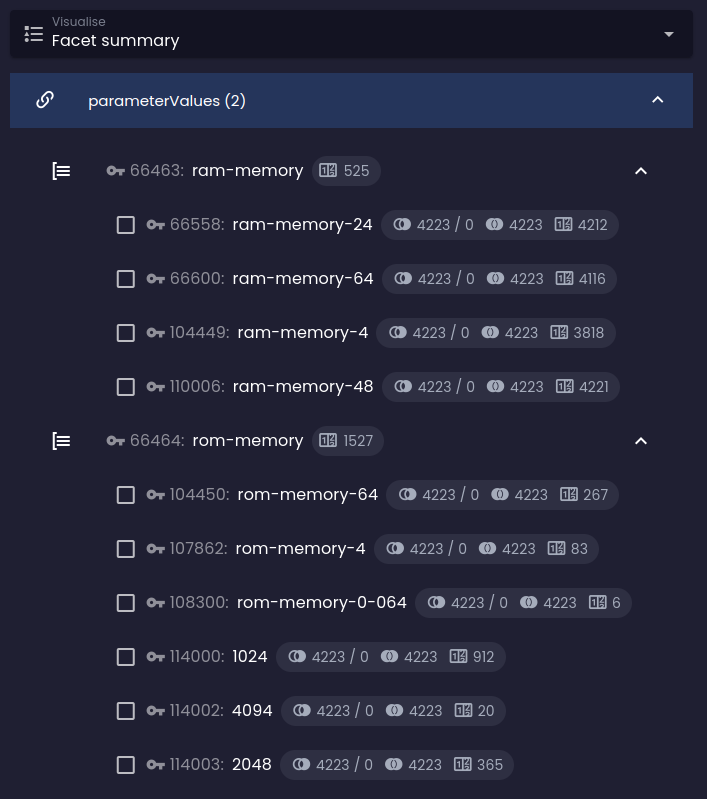 After After |
The predicted results in the negated groups are far larger than under the default behaviour: selecting any option in the RAM group now predicts thousands of results, whereas the ROM group with default behaviour predicts only a dozen:
Facet groups exclusivity
- argument:string!
- Mandatory argument specifying the name of the reference to which this constraint refers.
- argument:enum(WITH_DIFFERENT_FACETS_IN_GROUP|WITH_DIFFERENT_GROUPS)
Default: WITH_DIFFERENT_FACETS_IN_GROUP
Optional enumeration argument specifying whether the relationship type should be applied to options at a particular level (within the same reference group, or to options in different reference groups / references).
- filterConstraint:filterBy
Optional filter constraint that selects one or more reference groups whose options are mutually exclusive.
If the filter is not defined, the behaviour applies to all groups of a given reference in the summary.
Because this operator doesn't affect the actual result-set output, it can only be used for the impact calculation when you want to see the effect of selecting only one option at a particular level.
| Default behaviour | Altered behaviour |
|---|---|
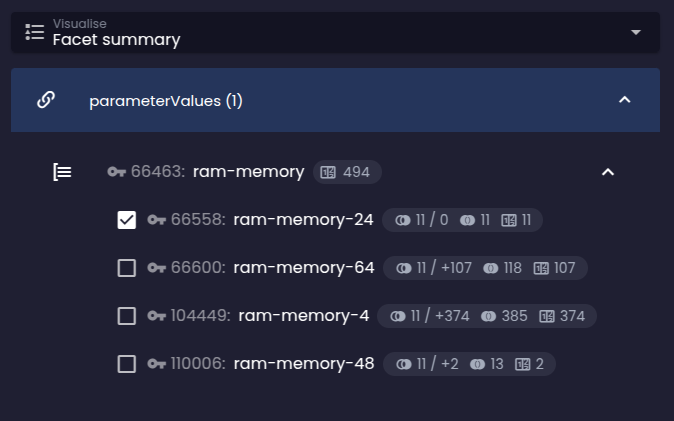 Before Before | 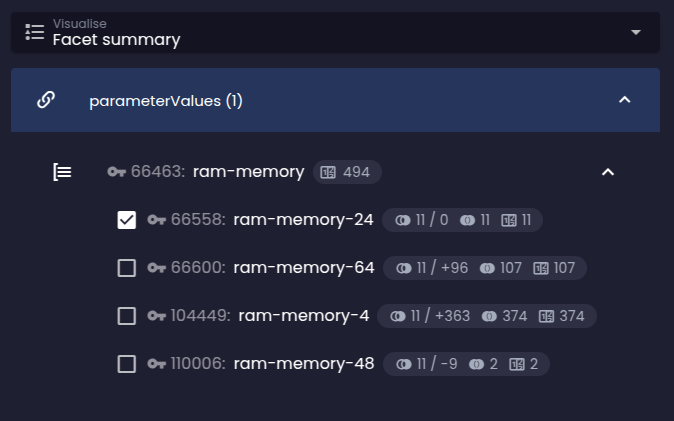 After After |
The predicted results in the exclusive groups differ from the default whenever there is an existing selection. With exclusivity in place, the current selection of an option in the RAM group does not affect the predicted counts — they remain identical to the no-selection case:
Facet calculation rules
- argument:enum(DISJUNCTION|CONJUNCTION|NEGATION|EXCLUSIVITY)!
Mandatory argument specifying the default relationship behaviour for options within the same reference group. You can change the default logical disjunction (logical OR) to a different value.
- argument:enum(DISJUNCTION|CONJUNCTION|NEGATION|EXCLUSIVITY)!
Mandatory argument specifying the default relationship behaviour for options between different reference groups or references. You can change the default logical conjunction (logical AND) to a different value.
- DISJUNCTION
Logical OR.
Effect on facet-having behaviour: an entity is present in the result once it has at least one of the selected options at a particular level (within the same reference group / between different groups).Effect on impact statistics: logical OR is likely to expand the number of results in the final set.- CONJUNCTION
Logical AND.
Effect on facet-having behaviour: an entity is present in the result once it has all selected options at a particular level (within the same reference group / between different groups).Effect on impact statistics: logical AND is likely to reduce the number of results in the final set.- NEGATION
Logical AND NOT.
Effect on facet-having behaviour: an entity is present in the result once it has none of the selected options at a particular level. As long as the other argument stays at the system default, it doesn't matter whether NEGATION is set within the same reference group or between different groups: by De Morgan's laws the result is the same (!a && !b is equivalent to !(a || b)).Effect on impact statistics: logical AND NOT is likely to expand the number of results when entities tend to carry only a small fraction of all possible options on average.- EXCLUSIVITY
Special operator stating that only one option can be selected at a given level (within the same reference group / between different groups). Useful for mutually exclusive references.
Effect on facet-having behaviour: none — it's up to the client to ensure that only one option is selected at a given level. If the client provides more than one, the system falls back to the system defaults (logical OR within the same group, logical AND between different groups).Effect on impact statistics: the calculated match count and impact will be computed for the situation where only this particular option is selected and no others in the same group / in different groups are.Note: because this operator doesn't affect the actual result-set output, it can only be used for the specific impact calculation if you want to see the impact of selecting only one option at a particular level.
Changing the default reference-summary calculation rules is similar to configuring each individual group relationship via dedicated requirements:
A sample query that changes the default calculation rules: